
Trending prompt
Sheru Bhai AI Photo: Pose With the White Lion Don, Paw on Your Shoulder
The Sheru Bhai AI photo editing prompt everyone is pasting, a real result made here, and a one-click way to stand next to him using your own photo.
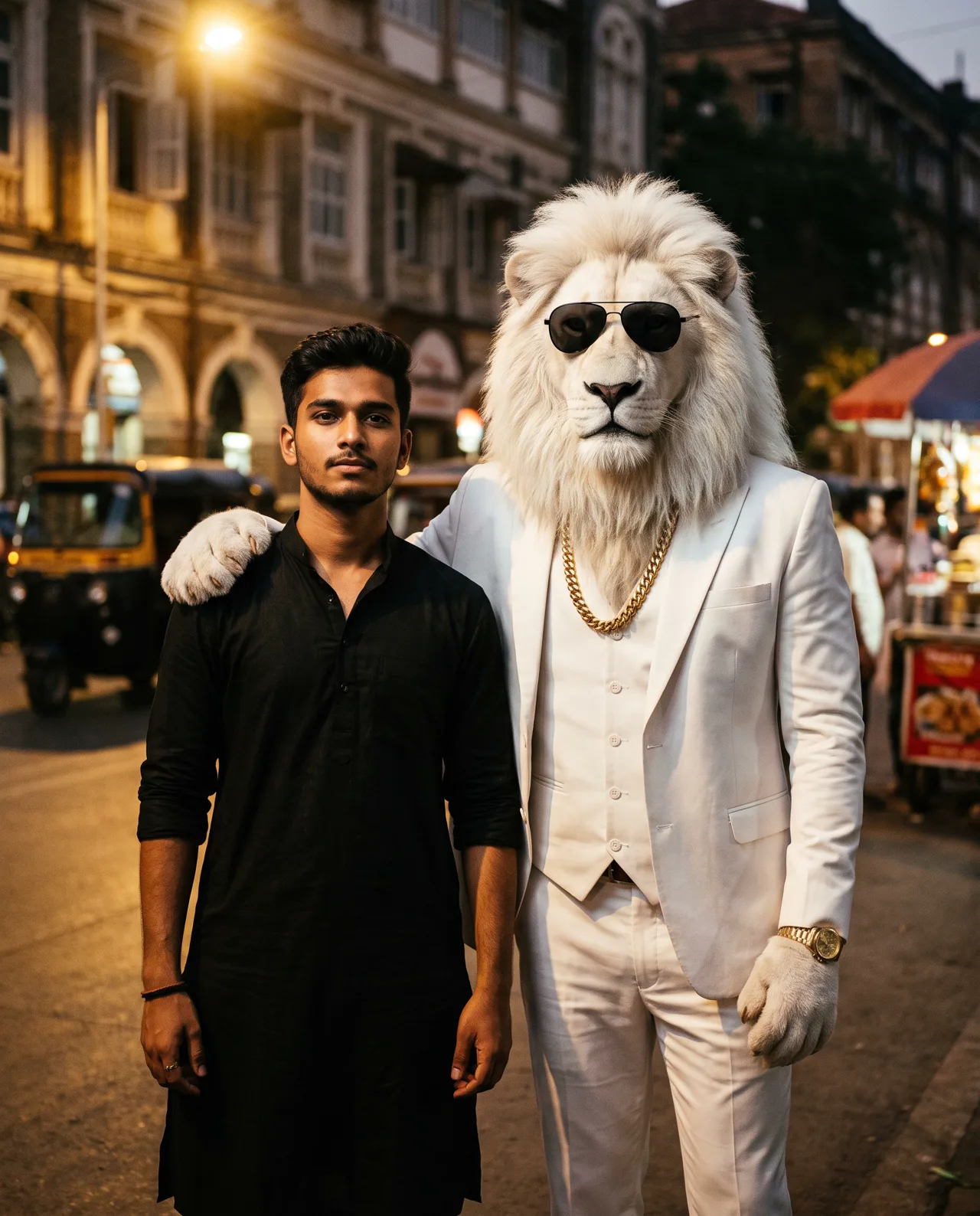
Prompt (copy & paste)
Create a cinematic photo of me standing next to Sheru Bhai: a tall anthropomorphic white lion man with a thick snow-white mane and pale gold eyes, wearing a tailored white three-piece suit, black aviator sunglasses, a gold Cuban-link chain and a gold watch, his paw resting on my shoulder like an older brother. Warmly lit Mumbai street at dusk, shallow depth of field, 85mm look. Keep my face, hairstyle and outfit exactly as in the reference photo.
Each image costs credits you buy once, with no subscription required; new accounts can start with the first-order taster pack, and any image that fails is refunded. See all plans
Results are AI-generated and can differ from your photo, so check them before sharing. Only upload photos of yourself or of people and pets you have the right to use; uploads stay private in your account and can be deleted at any time.
Tools for this prompt
What is the Sheru Bhai AI Photo trend?
Sheru Bhai is a fan-made fictional character: a tall white lion in a tailored white three-piece suit, black aviators, a gold chain and a gold watch, who carries himself like the don of every room he walks into. There is no film, brand or real person behind him. Creators across India started posting him in October 2026, and by November the Sheru Bhai AI Photo had taken over Instagram Reels and WhatsApp display pictures: people standing next to him with his paw on their shoulder like an elder brother, plus short clips of him bidding at auctions. The sample on this page was generated from text alone, so upload your own photo to get the real thing: a clear, front-facing picture with your face well lit and your outfit visible. PixBloom runs the Sheru Bhai AI Photo prompt as image-to-image, keeping your face, hairstyle and clothes as closely as it can while building the lion, the suit and the dusk-lit Mumbai street around you. Add up to four reference photos, wait about 30 seconds, and download the result without a watermark. PixBloom is not affiliated with the character or any of its creators.
How to use the Sheru Bhai AI Photo prompt with your photo
Upload your photo
Pick one to four photos with the face clear, well lit and not hidden by sunglasses or shadows. One good front-facing shot is enough; extra angles help the result stay closer to you.
Paste the prompt and adjust
Copy the prompt into the studio, then change what you like: the city, the outfit, the season or the mood. Keep the line about preserving facial features so the result stays recognizable.
Generate and download
The first result arrives in about 30 seconds. Download it without a watermark, or run it again with a tweak. Images that fail or time out are refunded automatically.
Sheru Bhai AI Photo: tips for better results
Use a clear front-facing photo
Pick a photo where your face is sharp, evenly lit and looking roughly at the camera, with your shoulders in frame so the paw has somewhere to rest. Group photos and heavy filters make the likeness drift.
Change the street, keep the suit
Swap 'Mumbai street at dusk' for your own city, a wedding stage, a rooftop at night or a railway platform. Keep the white suit, aviators and gold chain unchanged, since those are what make him read as Sheru Bhai.
Portrait ratio for Reels and DPs
Choose 4:5 or 9:16 so both of you fit standing side by side, with headroom above his mane. Add 'he is a head taller than me' if the first result makes him too short or too small.
More Sheru Bhai AI Photo prompt variations
Cinematic photo of me and Sheru Bhai, a white lion man in a white three-piece suit and black aviators, in the back seat of a black car at night, city lights behind us; keep my face from the reference photo.
Create a photo of me and Sheru Bhai, the white lion man in a white suit and gold chain, standing on a wedding stage under warm fairy lights, both smiling at the camera; keep my face and outfit from the reference photo.
Create a photo of Sheru Bhai, the white lion man in a white three-piece suit and black aviators, raising a paddle at a luxury auction, me seated beside him in the front row; keep my face from the reference photo.
Sheru Bhai AI Photo FAQ

Sheru Bhai AI Photo pricing: pay per image, no subscription
Taster pack · 15 HD images
150 credits that never expire. No subscription, one per account.
Sheru Bhai AI Photo: Pose With the White Lion Don, Paw on Your Shoulder
The Sheru Bhai AI photo editing prompt everyone is pasting, a real result made here, and a one-click way to stand next to him using your own photo.