
Trending prompt
Christmas Photo Booth Strip: Four Black-and-White Poses From One Photo
The TikTok photo booth prompt, a real strip made here, and a one-click way to turn one photo of you (or two photos of you and a friend) into four playful frames.
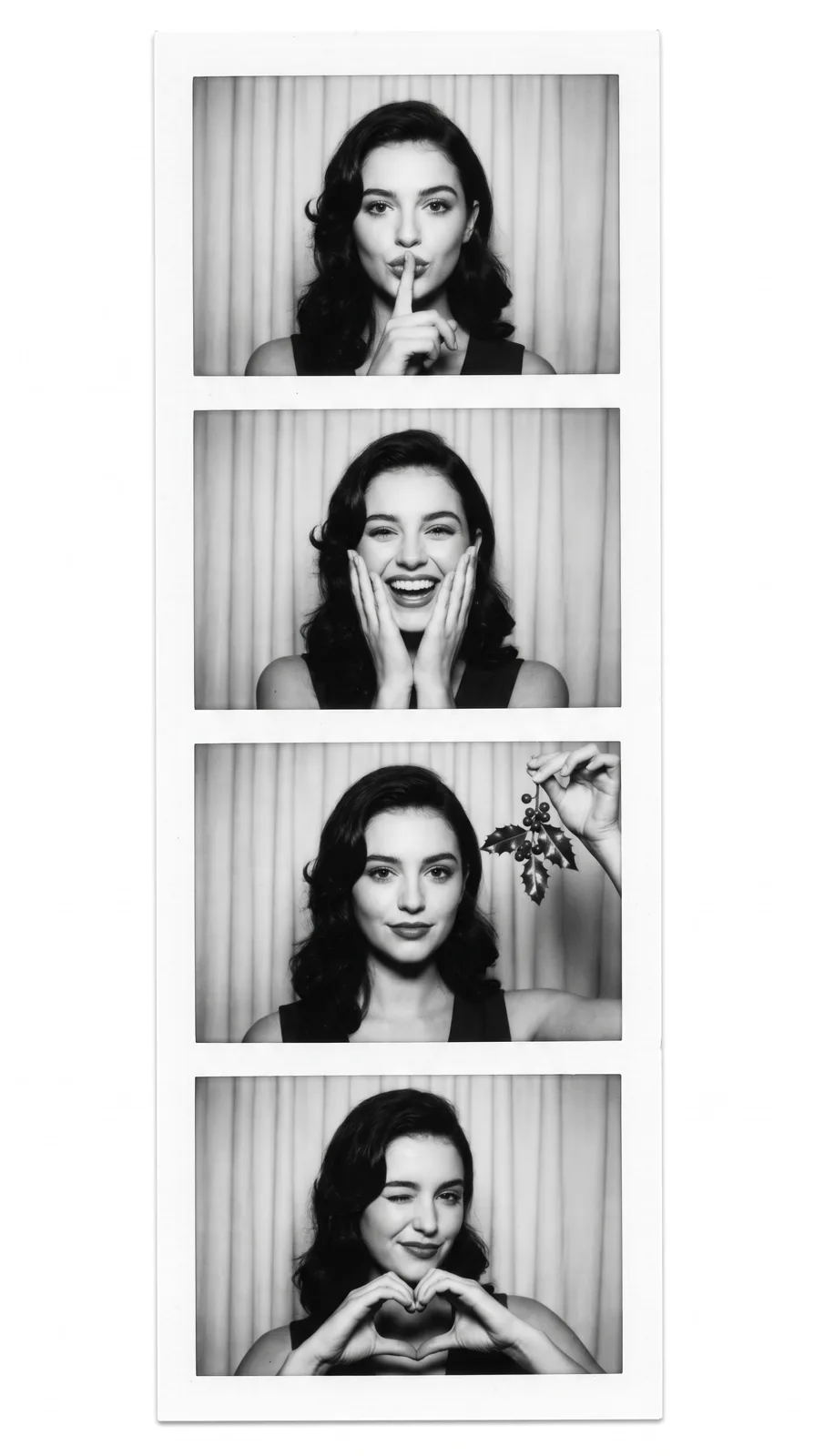
Prompt (copy & paste)
Turn the person in my reference photo into a vertical black-and-white Christmas photo booth strip of four stacked frames in front of a pale pleated curtain: a fingertip to the lips, laughing with both hands on the cheeks, holding a sprig of holly, and a wink while making a heart with the hands. White strip border, authentic instant photo-booth look with direct soft flash and slight grain. Keep my exact facial features; no text.
Each image costs credits you buy once, with no subscription required; new accounts can start with the first-order taster pack, and any image that fails is refunded. See all plans
Results are AI-generated and can differ from your photo, so check them before sharing. Only upload photos of yourself or of people and pets you have the right to use; uploads stay private in your account and can be deleted at any time.
Tools for this prompt
What is the Christmas Photo Booth Strip trend?
The Christmas Photo Booth Strip is a vertical black-and-white strip of four stacked frames, the kind a mall photo booth prints, shot in front of a pale pleated curtain: a fingertip to the lips, laughing with both hands on the cheeks, a sprig of holly, a wink with a hand-heart. It took off on TikTok in November 2026, when a reel using the format passed three million views in five days and revived an older December trend, and people began posting their own strips as early Christmas cards and profile pictures. You need one clear photo of yourself with your face visible and lit from the front, or one photo each if you want two people in the strip. PixBloom runs the Christmas Photo Booth Strip prompt as image-to-image, keeping your face while inventing the four new poses, the curtain and the flash. Upload up to four reference photos, wait about 30 seconds, and download the strip without a watermark. The sample here was generated from the text prompt alone, so upload your own photo to get your face in the frames.
How to use the Christmas Photo Booth Strip prompt with your photo
Upload your photo
Pick one to four photos with the face clear, well lit and not hidden by sunglasses or shadows. One good front-facing shot is enough; extra angles help the result stay closer to you.
Paste the prompt and adjust
Copy the prompt into the studio, then change what you like: the city, the outfit, the season or the mood. Keep the line about preserving facial features so the result stays recognizable.
Generate and download
The first result arrives in about 30 seconds. Download it without a watermark, or run it again with a tweak. Images that fail or time out are refunded automatically.
Christmas Photo Booth Strip: tips for better results
One face, one photo
Upload a single clear portrait with your face evenly lit; the model repeats that face across the four frames. For two people, upload one photo of each and write 'the two people in my reference photos' in the prompt.
Swap the four poses
The poses are the fun part, so replace any of the four: blowing a kiss, a peace sign by the eye, a Santa hat pulled low, hugging a wrapped gift. Keep the list to exactly four so the strip stays in order.
Use a tall ratio
Pick 9:16 or 4:5 so the four frames stack without cropping. If the frames come out uneven, add 'four equal square frames with thin white gaps' to the prompt, and 'color photo' if you want it in color.
More Christmas Photo Booth Strip prompt variations
Turn the person in my reference photo into a vertical color photo booth strip of four frames in front of a red velvet curtain: blowing a kiss, a peace sign by the eye, a Santa hat pulled low, hugging a wrapped gift. White border, soft flash, no text.
Turn the two people in my reference photos into a black-and-white photo booth strip of four frames: cheek to cheek, making one heart together, both winking, both laughing under a sprig of mistletoe. Pale curtain, white border, direct flash, no text.
Turn the person in my reference photo into a black-and-white photo booth strip of four frames in a knitted Christmas sweater: adjusting glasses, holding a mug, looking up at falling snow, a shy smile. Pleated curtain, white border, slight grain, no text.
Christmas Photo Booth Strip FAQ
Christmas Photo Booth Strip pricing: pay per image, no subscription
Taster pack · 15 HD images
150 credits that never expire. No subscription, one per account.
Christmas Photo Booth Strip: Four Black-and-White Poses From One Photo
The TikTok photo booth prompt, a real strip made here, and a one-click way to turn one photo of you (or two photos of you and a friend) into four playful frames.